Safety Audit Software: Complete Guide to Digital Safety Audits, Checklists and Compliance
Introduction
Safety Audit Software is helping organizations move from manual, paper-based inspections to a more organized digital safety management process. The Safety Master provides TSM-Safety Audit Software designed to support hazard identification, risk assessment, corrective action tracking, safety performance monitoring, customizable templates, and reporting.
What Is Safety Audit Software?
Safety Audit Software is a digital solution used to plan, conduct, document, track, and report workplace safety audits. Instead of maintaining multiple paper forms or spreadsheets, safety teams can manage audit activities through a centralized system.
How Does Safety Audit Software Work?
A typical digital audit process includes:
-
Creating or selecting an audit checklist
-
Assigning audits to responsible persons
-
Conducting workplace inspections
-
Recording observations and non-conformities
-
Uploading supporting evidence
-
Assigning corrective and preventive actions
-
Tracking action status
-
Generating audit reports
-
Monitoring safety performance
Why Businesses Are Moving From Manual Audits to Digital Audits
Manual audits can require significant paperwork, spreadsheet management, follow-ups, and report preparation. Digital safety audit systems can help improve consistency, visibility, and action tracking.
Key Features of Safety Audit Software
Digital Safety Audit Checklist
A digital Safety Audit Checklist allows safety professionals to conduct inspections systematically and record findings in one place.
Customizable Audit Templates
Organizations can create templates according to their workplace, industry, processes, and internal safety requirements.
Corrective Action Tracking
The system can help assign actions to responsible persons, establish deadlines, and monitor whether corrective actions have been completed.
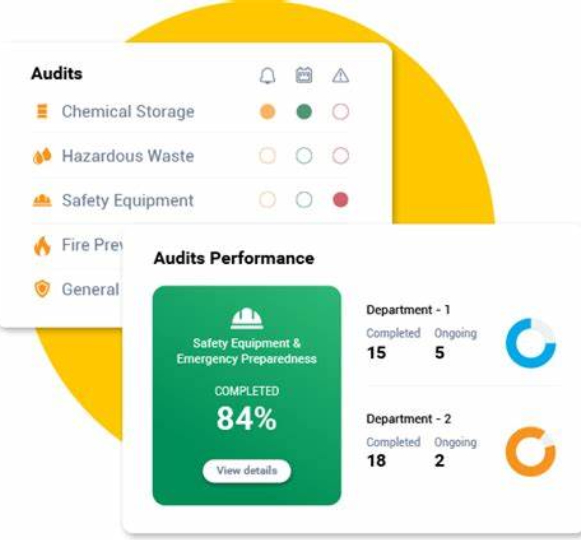
Audit Reports and Analytics
Digital reporting can provide management with a clearer view of audit findings, recurring issues, open actions, and overall safety performance.
Risk and Hazard Identification
Safety teams can document hazards and observations during audits and use the information to support risk reduction activities.
Safety Audit Checklist: What Should It Include?
A good safety audit checklist should cover the important hazards and compliance requirements applicable to the workplace.
Workplace Safety Checklist
Important areas may include:
-
PPE compliance
-
Housekeeping
-
Emergency exits
-
Fire protection systems
-
Electrical safety
-
Machine guarding
-
Material handling
-
Chemical storage
-
Work-at-height controls
-
Permit-to-work systems
-
Emergency preparedness
Safety Documentation Checklist
The audit may also verify:
-
Safety policies
-
Training records
-
Inspection records
-
Incident reports
-
Risk assessments
-
Emergency plans
-
Equipment inspection certificates
-
Corrective action records
Safety Audit Checklist Excel vs Digital Audit Software
A Safety Audit Checklist Excel file can be useful for basic inspections and small teams. However, as the number of audits, locations, users, and corrective actions increases, spreadsheet-based systems can become difficult to manage.
Limitations of Excel-Based Safety Audits
Common challenges include:
-
Manual data entry
-
Multiple versions of checklists
-
Difficult action tracking
-
Limited real-time visibility
-
Manual report preparation
-
Difficulty managing multiple locations
-
Increased possibility of data duplication
When Should You Move From Excel to Software?
Businesses should consider dedicated software when they need centralized audit records, multiple users, recurring inspections, automated action tracking, dashboards, and management reporting.
Safety Audit Software Free Download: Is It the Best Option?
People often search for Safety audit software free download when they want to digitize audits without making a large investment.
What to Check in Free Audit Software
Before selecting a free solution, check whether it provides:
-
Required audit templates
-
User access controls
-
Corrective action tracking
-
Reporting capabilities
-
Data security
-
Mobile accessibility
-
Customization
-
Technical support
A free tool may be suitable for basic requirements, but organizations with complex audit programs should evaluate the scalability and support available before selecting a platform.
Free Safety Audit Software vs Paid Solutions
Free safety audit software may be useful for small-scale testing or simple inspections. However, professional safety management often requires more advanced features.
Benefits of Professional Safety Audit Software
A professional platform can provide:
-
Centralized audit management
-
Customizable checklists
-
Corrective action management
-
Audit history
-
Reporting and analytics
-
Multi-site management
-
Better visibility for management
-
Expert support
What Is Free Audit Software?
Free audit software generally refers to software or tools available without an upfront license fee. However, users should check limitations related to users, storage, features, reports, integrations, and technical support.
Businesses should select software based on their actual safety management requirements rather than choosing a platform only because it is free.
Construction Site Audit Software
Construction site audit software is designed to support safety inspections and audits across construction activities and job sites.
Important Construction Audit Areas
A construction audit can cover:
-
Scaffolding
-
Work at height
-
Excavation
-
Lifting and rigging
-
Electrical installations
-
PPE
-
Housekeeping
-
Barricading
-
Heavy equipment
-
Temporary structures
-
Fire safety
-
Emergency preparedness
Benefits for Construction Companies
Digital construction audits can help safety teams record site observations, assign corrective actions, monitor deadlines, and maintain audit records across multiple projects.
Food Safety Auditing Software
Food safety auditing software can help food-processing and food-service organizations organize inspections and monitor food safety findings.
Key Food Safety Audit Areas
Depending on the organization's requirements, audits may include:
-
Hygiene and sanitation
-
Food storage
-
Temperature control
-
Pest control
-
Cleaning procedures
-
Personal hygiene
-
Waste management
-
Equipment condition
-
Documentation
-
Corrective actions
Digital records can make it easier to identify recurring findings and monitor improvements.
How Safety Audit Software Improves Workplace Safety
Faster Audit Management
Digital workflows can reduce repetitive administrative work and make audit information easier to access.
Better Corrective Action Tracking
Instead of keeping corrective actions in separate spreadsheets or emails, organizations can manage findings and actions through a centralized process.
Improved Management Visibility
Reports and dashboards can help management understand safety trends and prioritize important actions.
Better Audit Records
A centralized digital system can provide organized records that can be reviewed when required.
How to Choose the Best Safety Audit Software
1. Check Industry Compatibility
Select software that can support your industry's safety requirements and audit processes.
2. Look for Customizable Checklists
Your organization should be able to create or modify audit questions according to its requirements.
3. Evaluate Corrective Action Management
Action assignment, responsibility, deadlines, and status tracking are important features.
4. Check Reporting and Analytics
Look for useful reports that help management understand audit performance and outstanding issues.
5. Consider Scalability
The platform should be capable of supporting additional users, locations, projects, and audit types as your organization grows.
6. Evaluate Support and Training
Technical support and user guidance can be important when implementing a new digital safety system.
Why Choose The Safety Master for Safety Audit Software?
The Safety Master offers TSM-Safety Audit Software as part of its digital safety solutions. The platform is designed to support hazard identification, risk assessment, corrective actions, safety performance monitoring, customizable templates, and reporting.
Organizations can also request a software demonstration and customized solution based on their safety audit requirements.
Safety Software Company In India: What Should Businesses Look For?
When selecting a Safety Software Company In India, organizations should evaluate more than just software features.
Important Selection Factors
Consider:
-
Industry experience
-
Safety domain expertise
-
Software functionality
-
Customization
-
Data security
-
Reporting
-
Customer support
-
Training and implementation
-
Scalability
-
Integration possibilities
A provider with both safety-management knowledge and digital expertise can help organizations implement software more effectively.
Benefits of Digitizing Safety Audits
Reduced Paperwork
Digital audits reduce dependence on physical forms and manual recordkeeping.
Centralized Information
Audit observations, actions, and reports can be managed in one digital environment.
Improved Accountability
Assigning corrective actions to responsible persons helps improve ownership.
Better Decision-Making
Organized audit data can help management identify recurring problems and prioritize improvement initiatives.
Continuous Safety Improvement
Regular audits combined with effective corrective action tracking can support continuous improvement in workplace safety.
Safety Audit Software Implementation: Step-by-Step Process
Step 1: Identify Audit Requirements
Identify the locations, departments, processes, and activities that require auditing.
Step 2: Develop Audit Checklists
Create checklists based on workplace risks, legal requirements, standards, and internal procedures.
Step 3: Configure the Software
Set up users, locations, audit types, workflows, permissions, and reporting requirements.
Step 4: Train Safety Teams
Train auditors, supervisors, managers, and other users on the digital audit process.
Step 5: Conduct Pilot Audits
Start with selected departments or locations to identify process improvements.
Step 6: Monitor Corrective Actions
Track findings, assign responsibilities, set deadlines, and monitor closure.
Step 7: Review Safety Performance
Use audit reports and trends to identify recurring issues and improve safety performance.
Common Mistakes to Avoid When Using Safety Audit Software
Using Generic Checklists
Checklists should reflect actual workplace hazards rather than simply copying generic questions.
Failing to Close Corrective Actions
Recording an observation is not enough. Organizations should ensure that corrective actions are completed and verified.
Not Training Users
Poor user understanding can reduce the effectiveness of the software.
Ignoring Audit Trends
Audit data becomes valuable when organizations analyze recurring findings and use them for preventive action.
Conclusion
A well-designed digital audit system can make workplace inspections more organized, improve corrective action tracking, and provide management with better safety visibility. Whether an organization needs construction site audit software, food safety auditing software, or a broader digital safety management solution, selecting the right platform is important for long-term results. The Safety Master provides Safety Audit Software designed to support modern safety audit and compliance requirements.